Free print tool
Print bleed & canvas size calculator
Pick your finished size and get the exact canvas to set up in Canva, Photoshop or Illustrator — in millimetres and pixels, with bleed and safe zone worked out for you. Then download a blank PDF template with all three guides drawn on.
ISO A sizes
Business cards
Printer upload specs
Canvas size (with 3mm bleed)
154 x 216 mm
1819 x 2551 px at 300 DPI
Finished (trim) size
148 x 210 mm
1748 x 2480 px
Safe zone (keep text inside)
140 x 202 mm
7mm in from the canvas edge
The template is a blank PDF at your exact canvas size with the bleed edge, cut line and safe zone drawn on and labelled. Drop it into Canva as a background, or place it as a locked guide layer in Illustrator, Photoshop or InDesign, then hide it before you export.
The three areas every print file needs
Every number this calculator gives you maps to one of three areas on the page. The template you download marks all three so you can see them while you design.
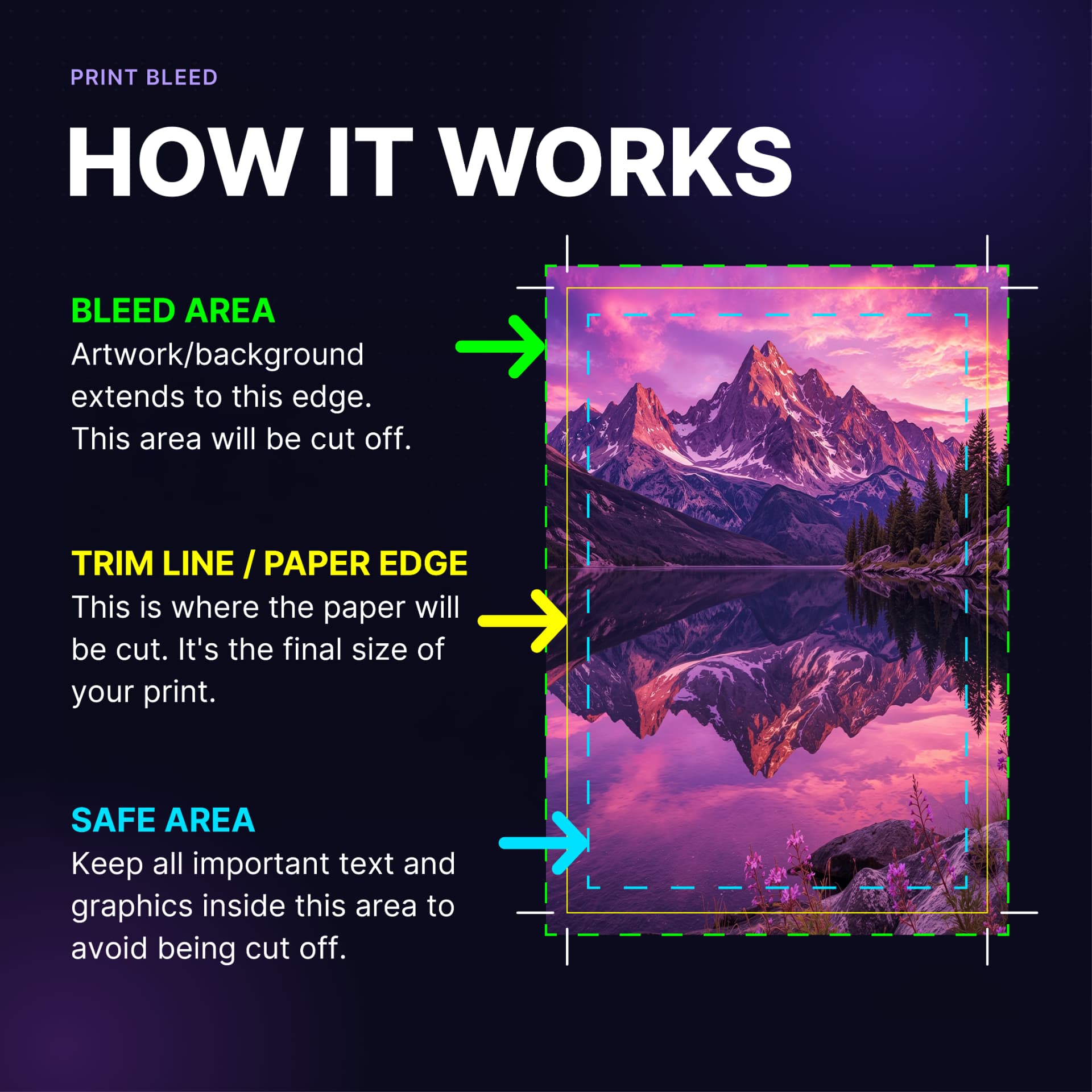
Bleed area
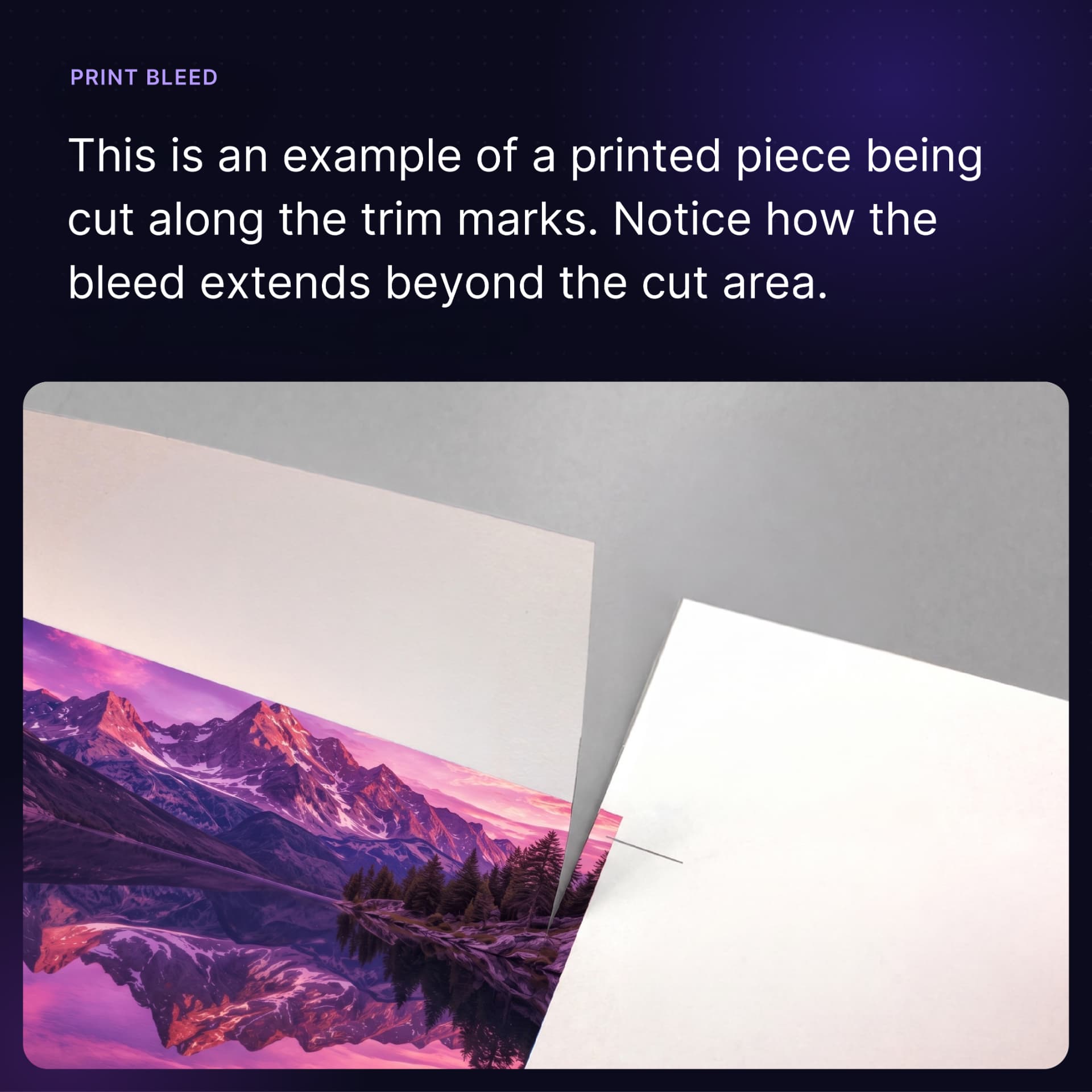
Background and photos extend past the cut line into this strip. It is sliced off during trimming, and it is why your canvas is bigger than the finished size.
Trim line
Where the guillotine cuts. This is the finished size of your print — the size you actually hold in your hand.
Safe zone
Keep logos, text and anything important inside this line so a slight blade drift can never clip it.
Why printers ask for bleed
Commercial printers print onto oversized sheets and slice them down to the finished size with a guillotine, often hundreds of sheets at a time. The blade can shift by a fraction of a millimetre, so a 3mm safety margin is added around every edge. Without it, one tiny wobble leaves an ugly white sliver along the edge of your print.
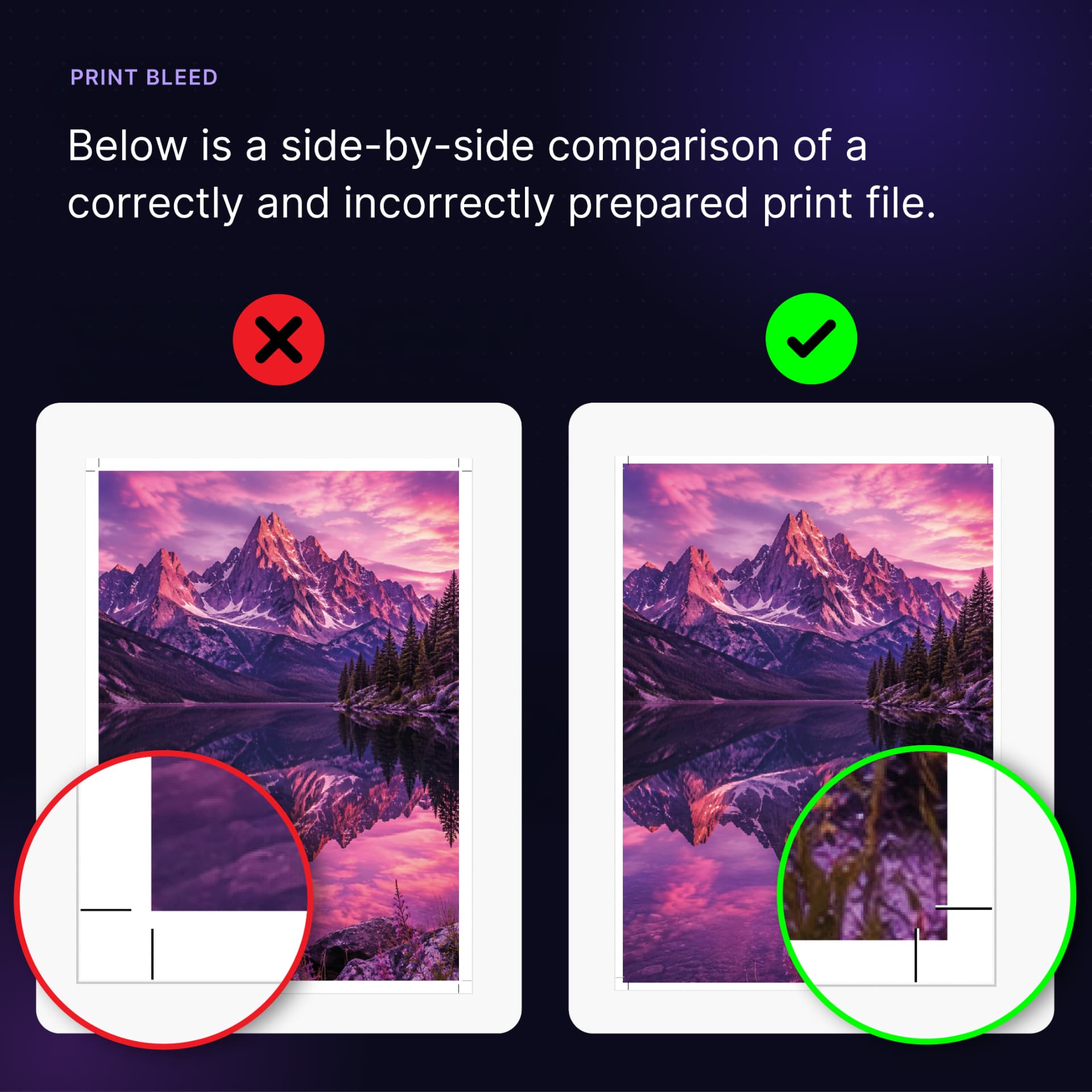
With bleed vs without
Same artwork, same printer. On the left the design stops at the trim line, so the cut exposes bare paper. On the right the artwork runs into the bleed, so the colour goes right to the edge however the blade falls.
Already designed it without bleed?
Don't start again. Upload your PDF and we'll mirror the edges to create proper bleed and add crop marks automatically — plus flag anything else your printer would reject.
Check my PDF freeUK print size cheat sheet
Standard sizes with 3mm bleed on every edge, and the matching canvas in pixels at 300 DPI.
| Size | Finished (mm) | Canvas + 3mm bleed | Pixels @ 300 DPI |
|---|---|---|---|
| A7 | 74 x 105 | 80 x 111 | 945 x 1311 |
| A6 | 105 x 148 | 111 x 154 | 1311 x 1819 |
| A5 | 148 x 210 | 154 x 216 | 1819 x 2551 |
| A4 | 210 x 297 | 216 x 303 | 2551 x 3579 |
| A3 | 297 x 420 | 303 x 426 | 3579 x 5031 |
| A2 | 420 x 594 | 426 x 600 | 5031 x 7087 |
| A1 | 594 x 841 | 600 x 847 | 7087 x 10004 |
| A0 | 841 x 1189 | 847 x 1195 | 10004 x 14114 |
| DL | 99 x 210 | 105 x 216 | 1240 x 2551 |
| Business card (UK/EU) | 85 x 55 | 91 x 61 | 1075 x 720 |
| Business card (US) | 88.9 x 50.8 | 94.9 x 56.8 | 1121 x 671 |
How to use these numbers
- Set your finished size, bleed and safe margin above.
- Create your design at the canvas size shown, not the finished paper size — or download the PDF template and work on top of it.
- Run background colours and photos all the way to the canvas edge.
- Keep logos and text inside the safe zone so nothing gets clipped.
- Export as PDF Print. If you're on the free Canva plan and can't add crop marks, upload the PDF here and we'll add them for you.
Bleed questions, answered
What is bleed in printing?
Bleed is extra artwork that extends past the trim line. It gets cut off when the printer trims the sheet down to size, so any background colour or photo that runs to the edge stays edge to edge with no white sliver.
How much bleed do UK printers need?
3mm on every edge is the UK and EU standard, which is what most printers including Vistaprint and instantprint ask for. Large format posters and booklets sometimes want 5mm, so check your printer's spec sheet.
What canvas size should I use in Canva for an A5 flyer?
Create the canvas at 154 x 216mm (A5 plus 3mm bleed on all four edges), which is 1819 x 2551 pixels at 300 DPI. Run backgrounds to the canvas edge and keep text at least 3mm inside the trim line.
What is the safe zone?
The safe zone is the area inside the trim line where text and logos are guaranteed not to be clipped. Guillotine blades can drift by a millimetre or two, so keep important detail 3 to 5mm in from the cut.
Can I download a blank bleed template?
Yes. Set your finished size, bleed and safe margin, then download a blank PDF template with the bleed, trim and safe zone drawn on and labelled. It has proper MediaBox and TrimBox values, so InDesign and Acrobat read the real cut size.
What happens if I send artwork with no bleed?
Most printers will either reject the file or print it with a thin white line along one or more edges. If your artwork is already finished, upload it to Printer Ready and we will mirror the edges to create bleed rather than you starting again.
Related: add bleed to a PDF · Canva bleed guide · convert RGB to CMYK